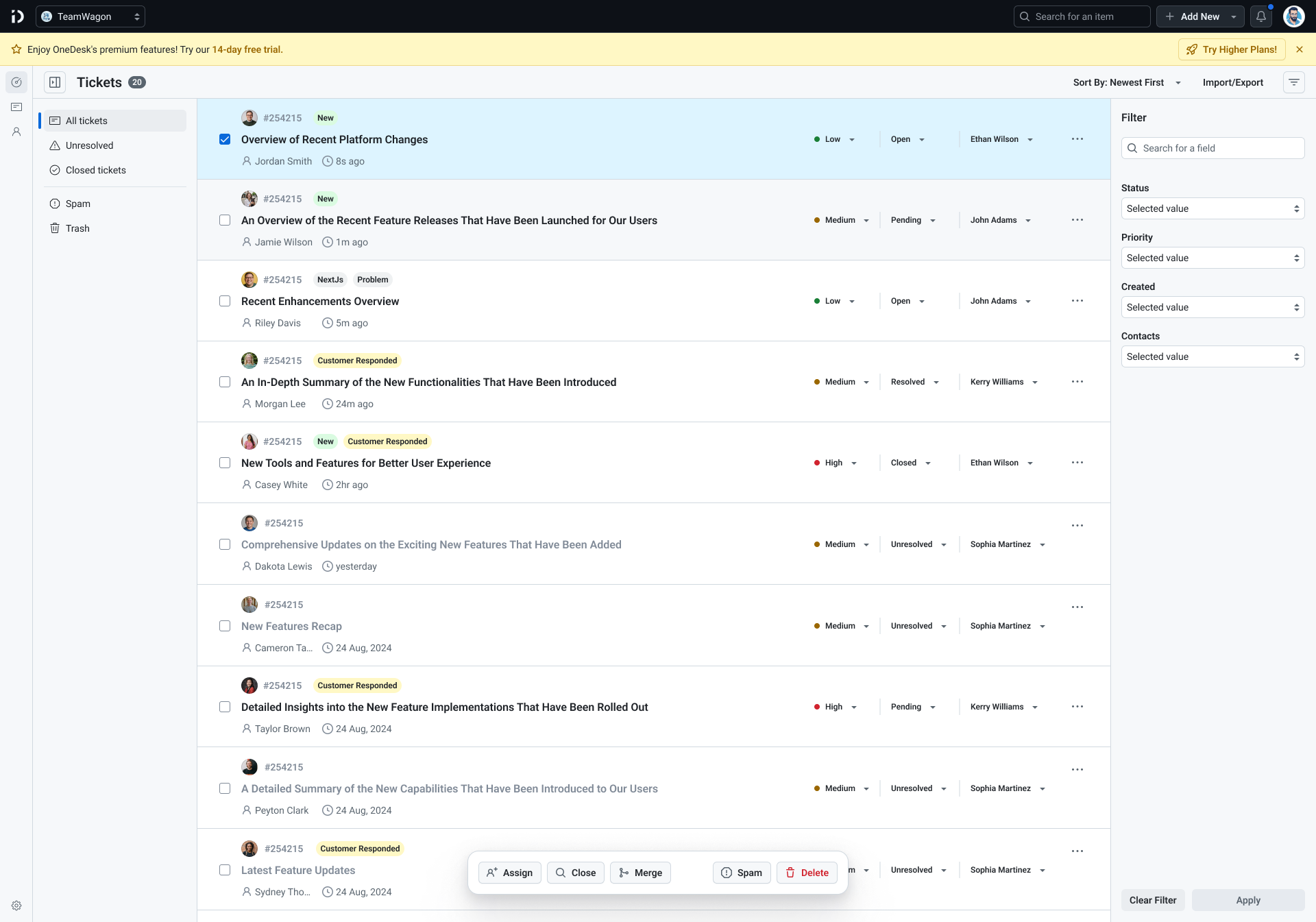
OneDesk - A customer support management webapp
This project was done as a part of ThemeWagon Ltd.
Duration: Apr, 2025- Aug, 2026
See live

Role
Lead Designer
Status
Live
Type
SaaS
B2B
Industry
Customer Service Software
Description
OneDesk is a low-friction, agent-focused support management application built to eliminate the operational inefficiency of legacy ticketing systems. The platform features unlimited agent capacity, multi-organization management, and accelerated communication tools, all driven by real-world support insights.
Key Tasks

Develop a customer service SaaS platform from the ground up
Analyze competitor reviews to capture user insights and guide product strategy
Build comprehensive and structured sitemaps
Design effective solutions tailored to each proposed feature
Ensure full responsiveness across all devices and screen sizes
Create a compelling landing page along with all public-facing pages
Work closely with developers to deliver a live, functional product
Flows and Pages I had to design
Landing + Public Pages
Onboarding
Dashboard
Ticket Response
Shared Inbox
Contact Mangement
Settings

Key Challenge
Create refined variations of existing flows familiar to the users

Balance
Define issues with popular webapps and explore effective solution
Competitor analysis
It all started with analyze the competitors in details and understand how they work
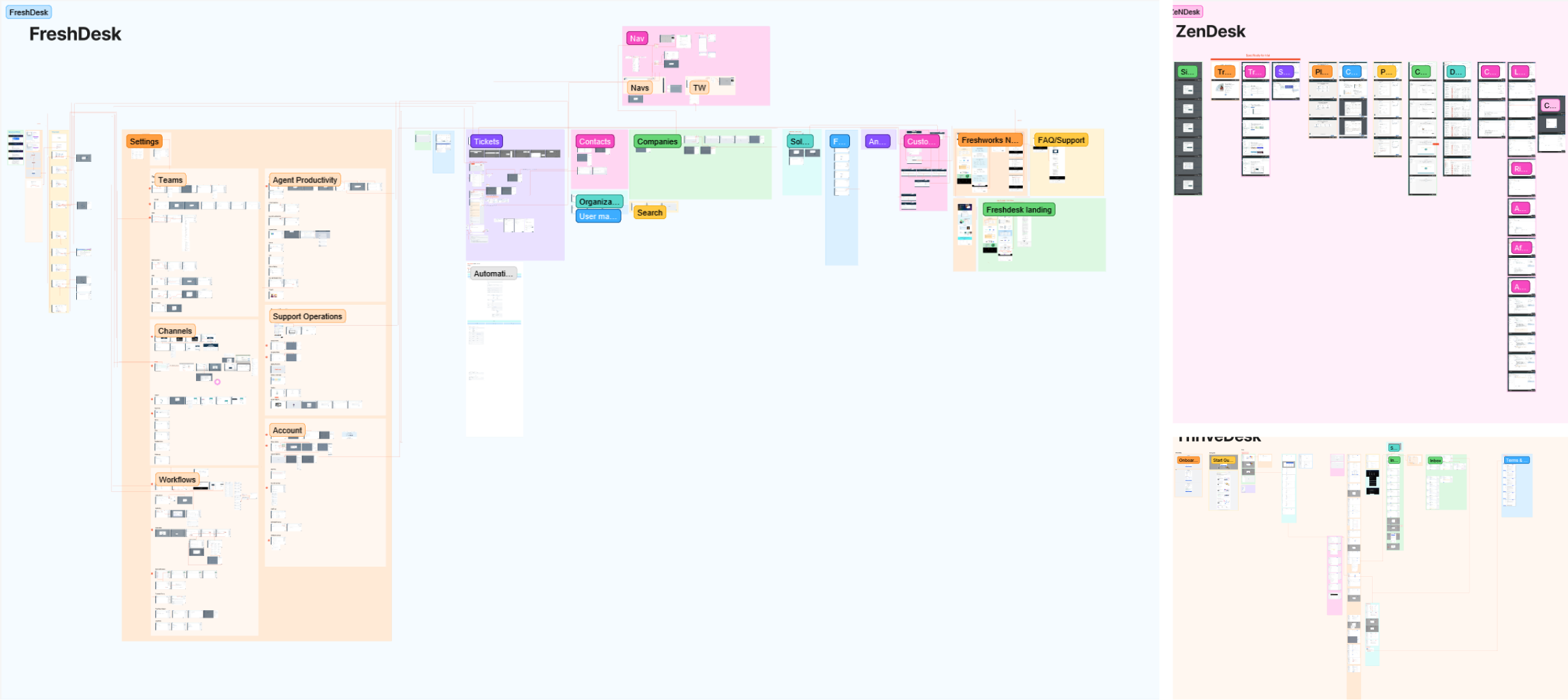
- Selected leading Support Desk web applications as case studies
- Conducted deep analysis to understand how they function
- Documented problems and pain points identified during review
- Created detailed sitemaps to map interrelations between workflows
I decided to explore the flows of 3 webapps: FreshDesk, Zendesk and ThriveDesk
Gained Insight:
A deep understanding about the flows that make a support desk software work.
Best features and problems
A detailed sitemap
This took a huge amount of time! But was worth every second!
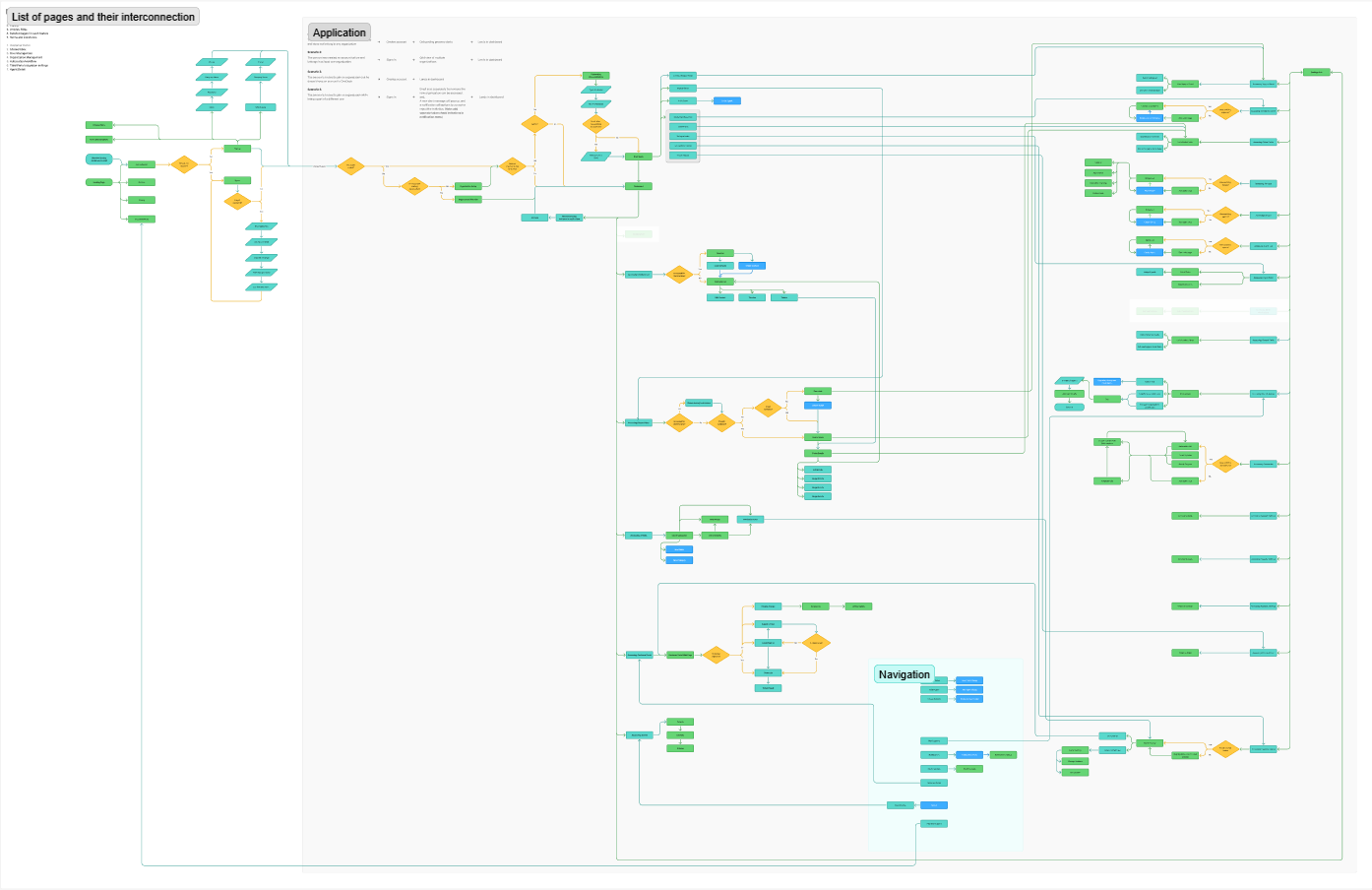
- Created a list including all pages.
- A sitemap interconnecting them in details.
See the full sitemap

Result:
Now I knew what pages will be there, and how they will be connected
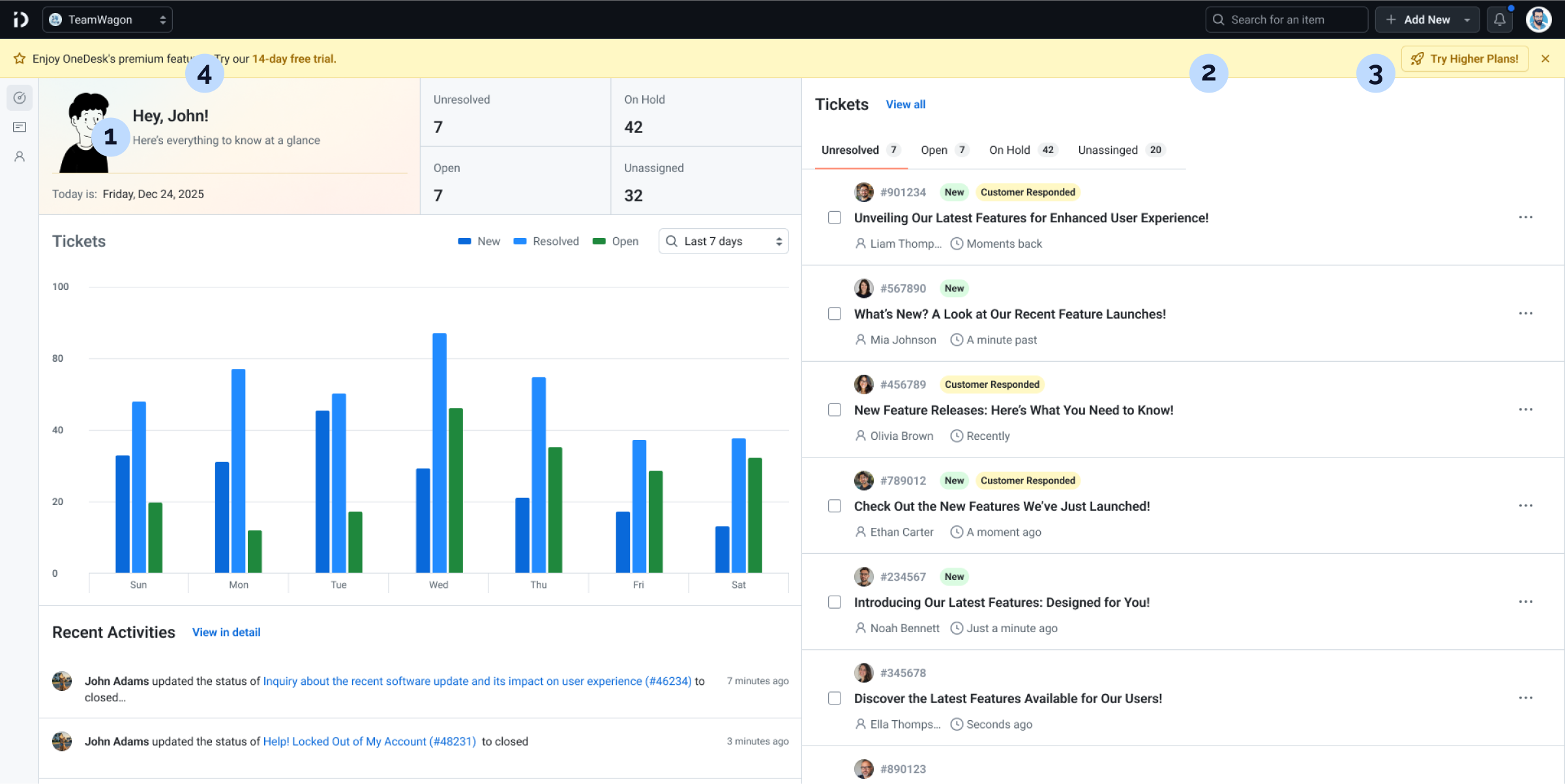
Navs & a dashboard for fast access
The entry point for regular users

Needed
- An immediate overview of all necessary information for agents.
- Easy access to different pages and features from anywhere within the app

What I did
1
Links to all the key pages were put in the sidenav, and were always visible
2
Top Nav contained a always-visible global search which agents could use to search for tickets, options, and more
3
A Add New button was placed that agents could use to directly create tickets or contacts.
4
Top Nav also had a dropdown that let agents immediately switchbetween organizations
Result:
Collaboration became faster, clicks became fewer.
Yes, all pages are fully responsive
and optimized for every device!
I closely collaborated with the devs for this project until it was live and running
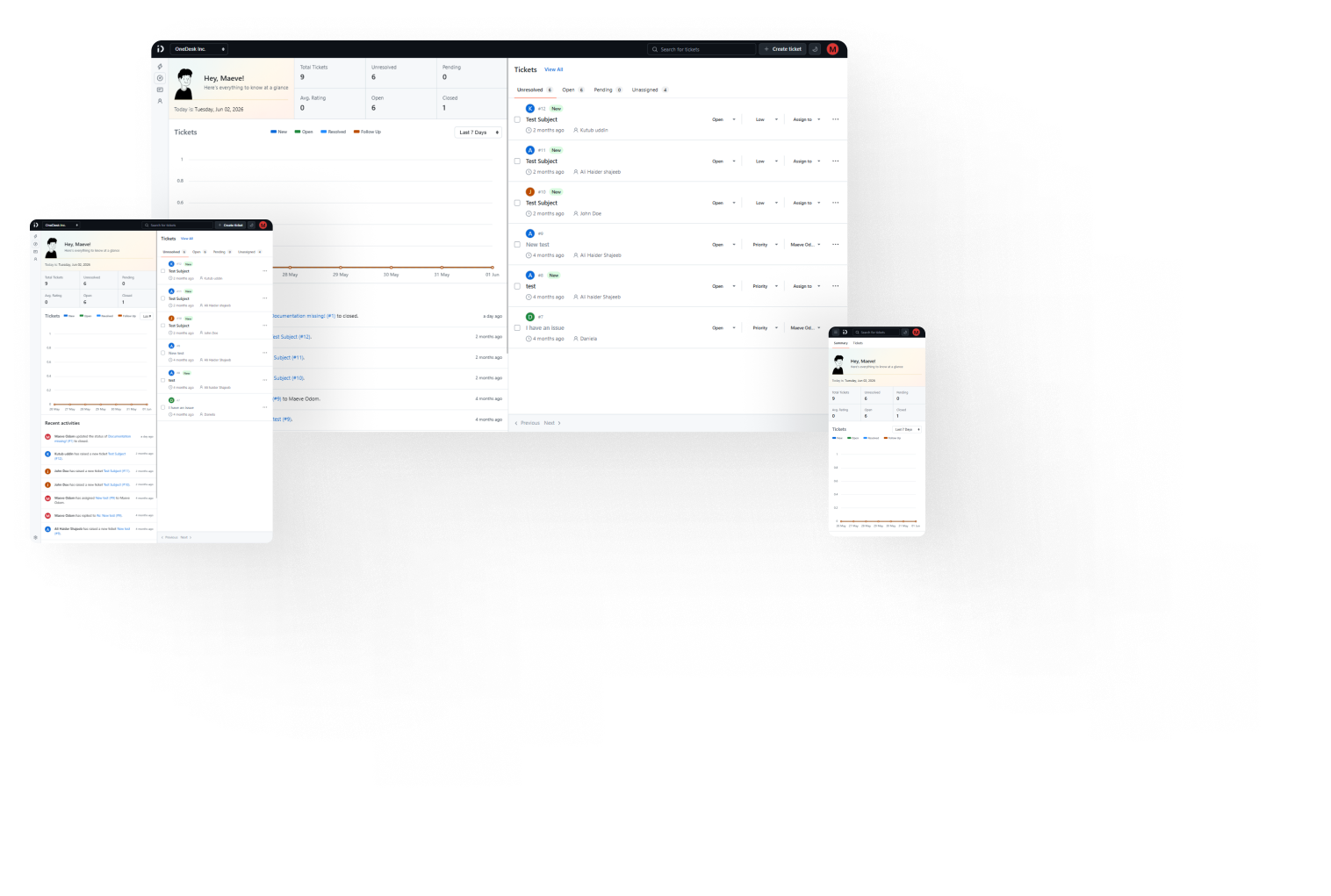
Shared inbox with an easy fix
A place where support agents could collaborate with each others
Issues with some other webapps
- Editing properties for each ticket requires opening them individually
- Wastes time
What I did
- Added editing options to each ticket directly within the inbox
Result:
Collaboration became faster, clicks became fewer.
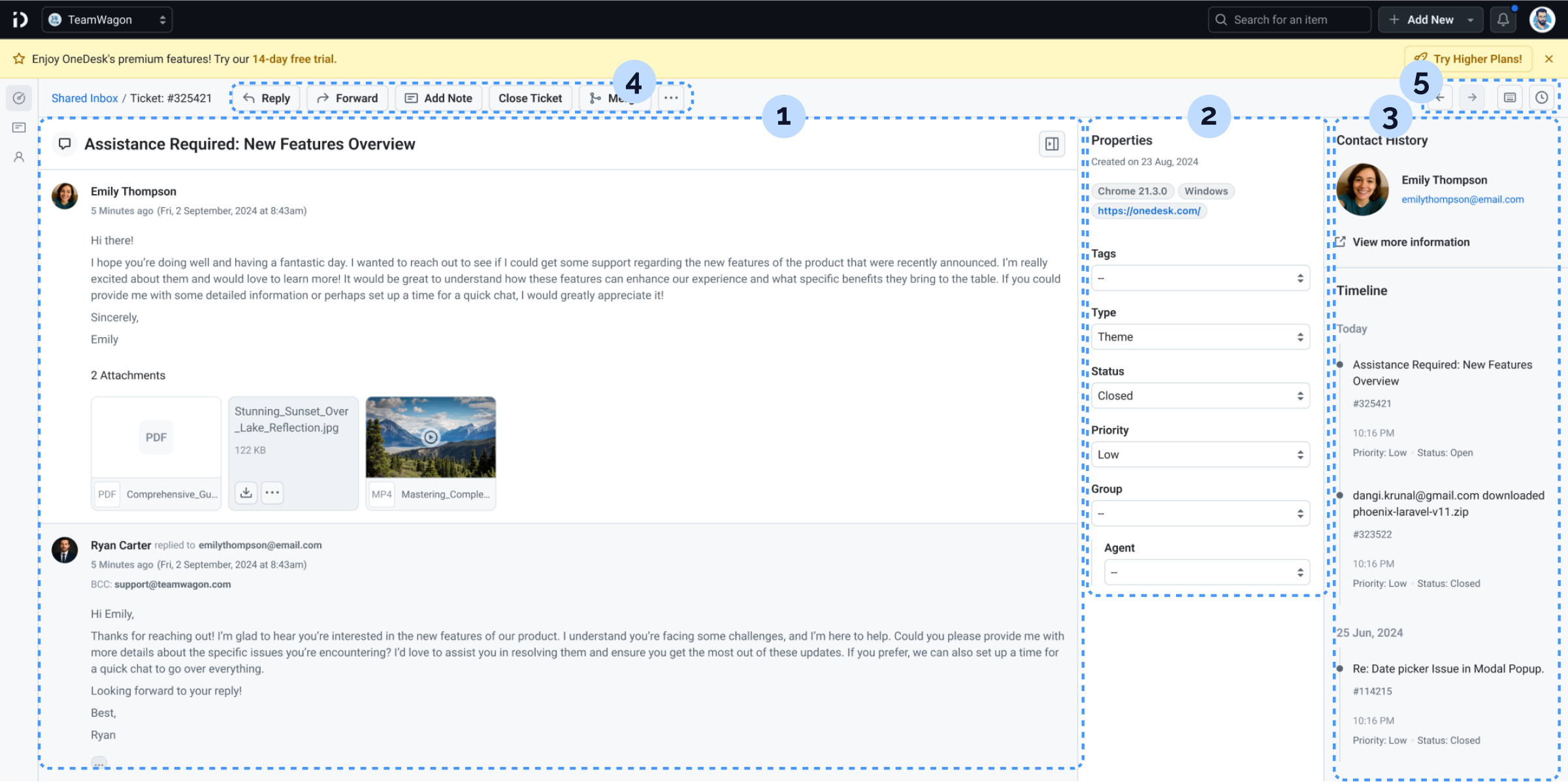
Customer Response page
Here agents could reply directly to customer tickets and share private notes, all with some additional features
Stuffs I included in the design
1
Conversation area where customers and agents interact, with two distinct background colors to clearly differentiate replies.
2
Properties panel right beside to change ticket states, change assignees, and more.
3
Ticket history log.
4
Action Buttons Right at the top, lets agents takes actions instantly.
5
Navigation button to move to other tickets without going back to the inbox.
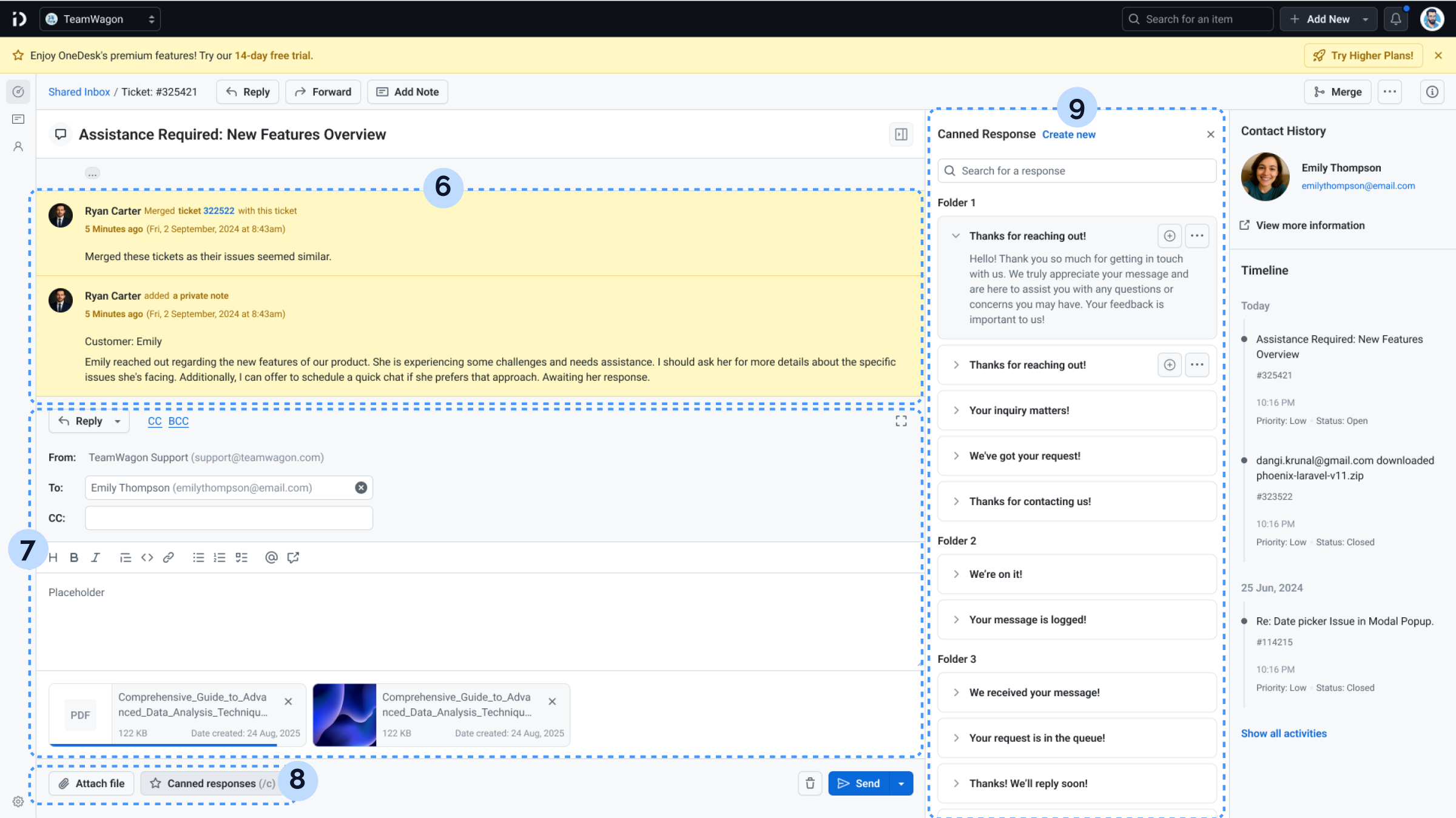
6
Different colored background for private notes and action updates.
7
Section to write responses or private notes.
8
Quick action buttons to attach files and open canned response.
9
Canned response panel replaces ticket properties to keep clutter at a minimum level.
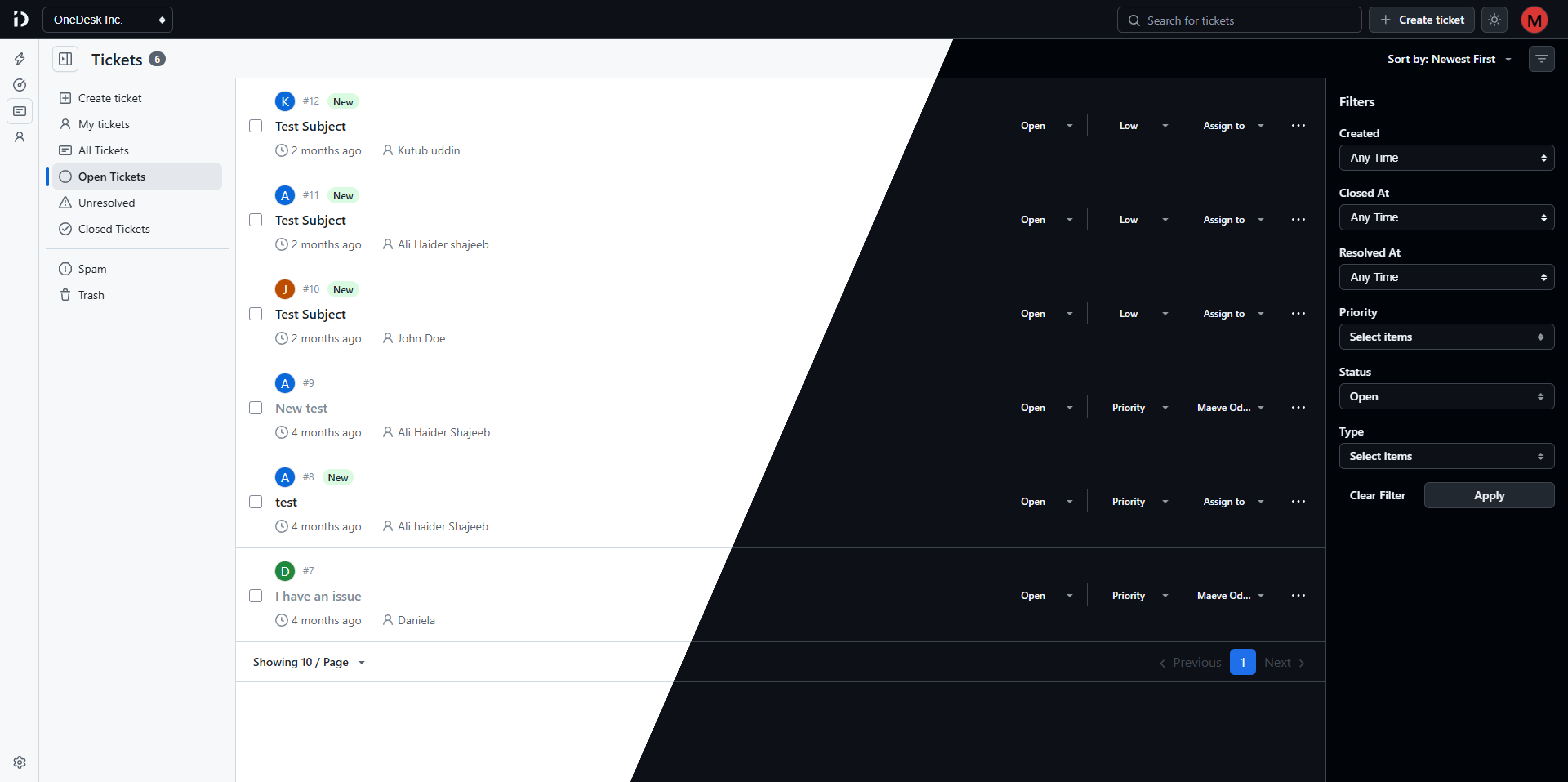
I had to work on the dark mode as well
Concise landing page that never bores
A page meant for the public, consisting of section conveying information about the product.
Challenge
- It needed to show all the key information about the product to the general public.
- Had to be concise, and sections needed to be engaging.
Some section I included in the page
Hero section with a title that immediately shows the product’s aim
Recorded and included a product demo video right below the Hero section
Created short looping animations showcasing different features.
I created these using Rive, then organized them in a Bento Grid for quick view.
View them in my motion works page
Some more Pages and Flows
These are some of the key flows which were needed for the app to be completed
Onboarding
Create Organization
Spot Highlights
Settings
UI Elements
These are some of the key flows which were needed for the app to be completed
Typography
Roboto
Roboto Mono
Display
Title/Large
Title/Medium
Title/Small
Body/Large Bold
Body/Large
Body/Medium
Body/Medium Bold
Body/Small
Body/Small Bold
CodeBlock
Link/Body Large
Link/Body Large Bold
Link/Body Medium
Link/Body Medium Bold
Link/Body Small
Link/Body Small Bold
Link/Caption
Color
Accent
bg-accent
Background
bg-default
bg-card
bg-emphasis
Foreground
fg-default
fg-secondary
fg-disabled
Illustrations



Want to see the product in action?
See live
©
2025


OneDesk - A customer support management webapp
This project was done as a part of ThemeWagon Ltd.
Duration: Apr, 2025- Aug, 2026
See live
Role
Lead Designer
Status
Live
Type
SaaS
B2B
Industry
Customer Service Software
Description
OneDesk is a low-friction, agent-focused support management application built to eliminate the operational inefficiency of legacy ticketing systems. The platform features unlimited agent capacity, multi-organization management, and accelerated communication tools, all driven by real-world support insights.
Key Tasks
Develop a customer service SaaS platform from the ground up
Analyze competitor reviews to capture user insights and guide product strategy
Build comprehensive and structured sitemaps
Design effective solutions tailored to each proposed feature
Ensure full responsiveness across all devices and screen sizes
Create a compelling landing page along with all public-facing pages
Work closely with developers to deliver a live, functional product
Flows and Pages I had to design
Landing + Public Pages
Onboarding
Dashboard
Ticket Response
Shared Inbox
Contact Mangement
Settings

Key Challenge
Create refined variations of existing flows familiar to the users
Balance

Define issues with popular webapps and explore effective solution
Competitor analysis
It all started with analyze the competitors in details and understand how they work
- Selected leading Support Desk web applications as case studies
- Conducted deep analysis to understand how they function
- Documented problems and pain points identified during review
- Created detailed sitemaps to map interrelations between workflows
I decided to explore the flows of 3 webapps: FreshDesk, Zendesk and ThriveDesk
Gained Insight:
A deep understanding about the flows that make a support desk software work.
Best features and problems
A detailed sitemap
This took a huge amount of time! But was worth every second!
- Created a list including all pages.
- A sitemap interconnecting them in details.
See the full sitemap
Result:
Now I knew what pages will be there, and how they will be connected
Navs & a dashboard for fast access
The entry point for regular users
Needed
- An immediate overview of all necessary information for agents.
- Easy access to different pages and features from anywhere within the app
What I did
1
Links to all the key pages were put in the sidenav, and were always visible
2
Top Nav contained a always-visible global search which agents could use to search for tickets, options, and more
3
A Add New button was placed that agents could use to directly create tickets or contacts.
4
Top Nav also had a dropdown that let agents immediately switchbetween organizations
Result:
Collaboration became faster, clicks became fewer.
Yes, all pages are fully responsive
and optimized for every device!
I closely collaborated with the devs for this project until it was live and running
Shared inbox with an easy fix
A place where support agents could collaborate with each others
Issues with some other webapps
- Editing properties for each ticket requires opening them individually
- Wastes time
What I did
- Added editing options to each ticket directly within the inbox
Result:
Collaboration became faster, clicks became fewer.
Customer Response page
Here agents could reply directly to customer tickets and share private notes, all with some additional features
Stuffs I included in the design
1
Conversation area where customers and agents interact, with two distinct background colors to clearly differentiate replies.
2
Properties panel right beside to change ticket states, change assignees, and more.
3
Ticket history log.
4
Action Buttons Right at the top, lets agents takes actions instantly.
5
Navigation button to move to other tickets without going back to the inbox.
6
Different colored background for private notes and action updates.
7
Section to write responses or private notes.
8
Quick action buttons to attach files and open canned response.
9
Canned response panel replaces ticket properties to keep clutter at a minimum level.
I had to work on the dark mode as well
Concise landing page that never bores
A page meant for the public, consisting of section conveying information about the product.
Challenge
- It needed to show all the key information about the product to the general public.
- Had to be concise, and sections needed to be engaging.
Some section I included in the page
Hero section with a title that immediately shows the product’s aim
Recorded and included a product demo video right below the Hero section
Created short looping animations showcasing different features.
I created these using Rive, then organized them in a Bento Grid for quick view.
View them in my motion works page
Some more Pages and Flows
These are some of the key flows which were needed for the app to be completed
Onboarding
Create Organization
Spot Highlights
Settings
UI Elements
These are some of the key flows which were needed for the app to be completed
Typography
Roboto
Roboto Mono
Display
Title/Large
Title/Medium
Title/Small
Body/Large Bold
Body/Large
Body/Medium
Body/Medium Bold
Body/Small
Body/Small Bold
CodeBlock
Link/Body Large
Link/Body Large Bold
Link/Body Medium
Link/Body Medium Bold
Link/Body Small
Link/Body Small Bold
Link/Caption
Color
Accent
bg-accent
Background
bg-default
bg-card
bg-emphasis
Foreground
fg-default
fg-secondary
fg-disabled
Illustrations
Want to see the product in action?
See live
See more of my stuffs
©
2025
Made with Figma Sites, blood, tears and coffee ☕
OneDesk - A customer support management webapp
This project was done as a part of ThemeWagon Ltd.
Duration: Apr, 2025- Aug, 2026
See live
Role
Lead Designer
Status
Live
Type
SaaS
B2B
Industry
Customer Service Software
Description
OneDesk is a low-friction, agent-focused support management application built to eliminate the operational inefficiency of legacy ticketing systems. The platform features unlimited agent capacity, multi-organization management, and accelerated communication tools, all driven by real-world support insights.
Key Tasks
Develop a customer service SaaS platform from the ground up
Analyze competitor reviews to capture user insights and guide product strategy
Build comprehensive and structured sitemaps
Design effective solutions tailored to each proposed feature
Ensure full responsiveness across all devices and screen sizes
Create a compelling landing page along with all public-facing pages
Work closely with developers to deliver a live, functional product
Flows and Pages I had to design
Landing + Public Pages
Onboarding
Dashboard
Ticket Response
Shared Inbox
Contact Mangement
Settings

Key Challenge
Create refined variations of existing flows familiar to the users
Balance
Define issues with popular webapps and explore effective solution
Competitor analysis
It all started with analyze the competitors in details and understand how they work
- Selected leading Support Desk web applications as case studies
- Conducted deep analysis to understand how they function
- Documented problems and pain points identified during review
- Created detailed sitemaps to map interrelations between workflows
I decided to explore the flows of 3 webapps: FreshDesk, Zendesk and ThriveDesk
Gained Insight:
A deep understanding about the flows that make a support desk software work.
Best features and problems
A detailed sitemap
This took a huge amount of time! But was worth every second!
- Created a list including all pages.
- A sitemap interconnecting them in details.
See the full sitemap
Result:
Now I knew what pages will be there, and how they will be connected
Navs & a dashboard for fast access
The entry point for regular users
Needed
- An immediate overview of all necessary information for agents.
- Easy access to different pages and features from anywhere within the app
What I did
1
Links to all the key pages were put in the sidenav, and were always visible
2
Top Nav contained a always-visible global search which agents could use to search for tickets, options, and more
3
A Add New button was placed that agents could use to directly create tickets or contacts.
4
Top Nav also had a dropdown that let agents immediately switchbetween organizations
Result:
Collaboration became faster, clicks became fewer.
Yes, all pages are fully responsive
and optimized for every device!
I closely collaborated with the devs for this project until it was live and running
Shared inbox with an easy fix
A place where support agents could collaborate with each others
Issues with some other webapps
- Editing properties for each ticket requires opening them individually
- Wastes time
What I did
- Added editing options to each ticket directly within the inbox
Result:
Collaboration became faster, clicks became fewer.
Customer Response page
Here agents could reply directly to customer tickets and share private notes, all with some additional features
Stuffs I included in the design
1
Conversation area where customers and agents interact, with two distinct background colors to clearly differentiate replies.
2
Properties panel right beside to change ticket states, change assignees, and more.
3
Ticket history log.
4
Action Buttons Right at the top, lets agents takes actions instantly.
5
Navigation button to move to other tickets without going back to the inbox.
6
Different colored background for private notes and action updates.
7
Section to write responses or private notes.
8
Quick action buttons to attach files and open canned response.
9
Canned response panel replaces ticket properties to keep clutter at a minimum level.
I had to work on the dark mode as well
Concise landing page that never bores
A page meant for the public, consisting of section conveying information about the product.
Challenge
- It needed to show all the key information about the product to the general public.
- Had to be concise, and sections needed to be engaging.
Some section I included in the page
Hero section with a title that immediately shows the product’s aim
Recorded and included a product demo video right below the Hero section
Created short looping animations showcasing different features.
I created these using Rive, then organized them in a Bento Grid for quick view.
View them in my motion works page
Some more Pages and Flows
These are some of the key flows which were needed for the app to be completed
Onboarding
Create Organization
Spot Highlights
Settings
UI Elements
These are some of the key flows which were needed for the app to be completed
Typography
Roboto
Roboto Mono
Display
Title/Large
Title/Medium
Title/Small
Body/Large Bold
Body/Large
Body/Medium
Body/Medium Bold
Body/Small
Body/Small Bold
CodeBlock
Link/Body Large
Link/Body Large Bold
Link/Body Medium
Link/Body Medium Bold
Link/Body Small
Link/Body Small Bold
Link/Caption
Color
Accent
bg-accent
Background
bg-default
bg-card
bg-emphasis
Foreground
fg-default
fg-secondary
fg-disabled
Illustrations
Want to see the product in action?
See live
See more of my stuffs
UX/UI projects

Branding
Character Design
Digital Artworks
Blog Illustrations
Motion Design
©
2025
Made with Figma Sites, blood, tears and coffee ☕